


Essential Elements for a Good Business Website: As the title suggests, in this post we are going to discuss essential elements required for a successful online website. Gone are the days when even having a website with a simple business description was enough. In the new era of internet business, you need to have a perfect website or you will be out of the game.
Planning a successful business cannot ever be imagined without an effective website. The most important thing you should keep in mind is to pay the required attention that your website deserves because an ineffective website does nothing more than wasting your time and money.
Here are the 14 essential elements of a good website –
1. Identify your goals
Setting up your goal is very important. Make a list of everything you want from your website. Create a list of queries like what kind of website you want to design, why you are designing the website, what outcomes you expect from that web and many more.
Identifying your goals and planning a strategy according to those goals is the first step of your hundred miles journey here. Niche, name, logo, title, and tagline of your website depend totally upon the goals.

2. Clear site navigation and architecture
Having clear site navigation helps your visitors easily find what they are looking for. Not only visitors, but clear site navigation also helps search engines in indexing your website pages easily.
Every important page of a good business website is directly linked to the home page. Any page of your website should not be two clicks away from your home page.
Consider using a silo architecture for your website. Silo architecture helps in better organizing your pages into various sections.
3. Craft the perfect home page
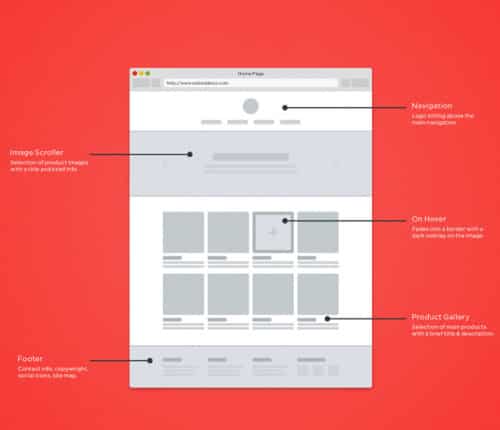
One of the most surprising facts about generating traffic on a website is that your website should have the potential to impress the visitor within the first 10 seconds he or she visits your website. Actually, these moments are very valuable because over 90% of visitors take an immediate decision about you and your website by watching the home page. A good business website should not leave scope for guessing, it should clearly convey what’s on offer as soon as a visitor arrives.
You should ensure the perfectly finished elevator pitch. In this series, don’t forget to recheck that your logo, promo message, tagline, and the first paragraph of the home page is pretty impressive to make the visitor stay over there and browse your website further.
4. Clear & Visible call to action
What you want your visitors to do on your website? The desired action you want should be clear to the visitor. In general, a call to action includes a ‘buy now button or display of contact numbers, or request a quote. You have a visitor on the website interested in your service.
Now your website should clearly guide them on what should be their next step to buy your product, service. Call to action is important to turn a website visitor into a business lead or conversion.
Call to action should be designed in the way that visitors during the tour to your website in order to seek information should know more about the product and services you offer simultaneously. This is how you will be able to lead them towards your website even if they are not intentional for it and further an impressive call to action convinces them to commit a purchase or send an inquiry.
Experienced web design service providers always add contact info in the top right and footer with their quick links invaluable web content. Buy now or request a quote button that should stand out and clearly visible from the rest of the content of the website. Generally, the use of a different color constantly for the call to action on the website proves very effective.
5. Mobile-friendly version
Nowadays, over 60% of visitors prefer to open websites on their smartphone devices for which all the leading websites are designed to ready with their mobile-friendly version. If you don’t want to stay behind your competitors, you should also prefer designing the mobile version of your website.
Every second, 25% of people are using smartphones and tablets for browsing webs and this is why your website should be mobile optimized.
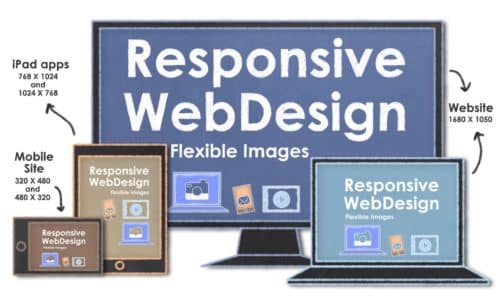
Definitely, you won’t like to miss that crowd of visitors you can have when you are designing a mobile-optimized website. Responsive web design is the best solution to do so as this kind of design demonstrates the web content well regardless of the kind of device on which it has been opened.
Search engines like google check the mobile-friendliness of a website to prepare search results for mobile devices. Check out my earlier post: Responsive website a must ahead of the latest Google update on the topic.
6. Importance of ‘about us’
Now, it’s time to leave the idea of designing a boring about us page. Although, it seems different but impressive to tell more about your customers than the company on the about us page. Actually, customers want to feel about every company that the group exists on the basis of customers’ favor only.
This is how; you can create a humble and engaging portrait of your team before visitors. You should present your information attractively in this section of the web.
7. Content is king
It will not be wrong to say that content works asking for the success of every website. There is no alternative to high-quality content. Whether you talk about marketing efforts or about delivering useful information to visitors, only good quality content can engage visitors.
It is nothing but a vital tool for being used smartly in lead generation. High-quality contents make your visitors more likely to know about your business and enjoying your services, purchasing your products, etc.
8. Excellent visual design
This is the basic thing but it works as an essential element for the success of your website, no doubt. Anesthetic design and interesting visuals impress your visitors more than anything. Creative web designing ideas and compelling style is something that makes you different from others.
The principle of applying attractive templates in web designing reflects your brand well and successfully catches your visitors.
9. Robust CMS and backend infrastructure
The usability of a business website depends a lot upon CMS and structure especially in the case of eCommerce websites. This all depends upon the ability of your website to updating content and interacting with visitors. At this point, SEO-friendly CMS becomes one of the most important things to keep your website at top ranking.
The platform your website is built upon creates a huge impact on its usability, performance, and how easily you can update the content of your website and interact with your visitors. While selecting a content management system for your website, you should check the following things –
- Simple content editing from any device, any time
- Backed by a Wide community of designers and developers so you can get help when needed such as WordPress
- SEO friendly
- Secure enough to prevent hacking attempts
- Faster loading speed
10. Tracking of conversions
Some of the web designers don’t pay attention to the idea of tracking their visitors, knowing about inquiries and sales received by the website. Well… They should understand that tracking the conversions is a good strategy to implement for a successful website. This is how; you can not only evaluate the marketing strength of the website but also measure the cost which is required to acquire visitors.
11. Smart marketing strategy
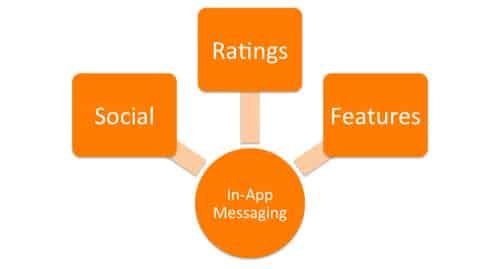
Just designing a website and launching it is not enough for those who have high ambitions. The success of a business website means more than just an online presence and it depends upon a smart marketing strategy.
Many modern marketing techniques are there on which you can trust for the success of your websites such as pay-per-click advertising, search engine optimization, email marketing, and social media.
According to your business, you can choose the best strategy that will work best among all.
12. Poised and perfect
Never ever allow your website to become slow and sloppy only because of those broken images and dead links. This is all that let you down at the first stage only. You will surely not love to look unorganized, imperfect, and vain on the internet even if you don’t want to earn money from your website, right?
So, audit your website from time to time and click on links and update them regularly. Make sure they work every time they are being clicked. If you miss this point, it will definitely be counted under violation of internet etiquettes too.
13. Define metrics and reviews
Monitoring the performance of your website is important if you want to track whether it is working or not. Always keep the list of your goals handy and match the performance of the website to check whether it is moving towards your goals or not.
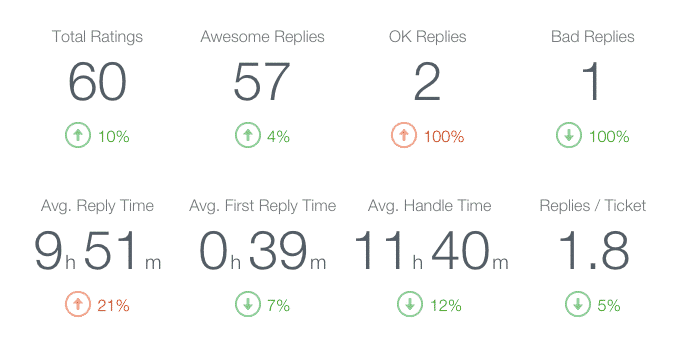
Create parameters about what to be tracked and measured in order to determine the performance of your web. This is how you will be able to turn your website successful shortly. You can note down your reviews every time you analyze your website and also discuss with professional advisers about creating pathways for the success of the website.
14. Seek support
Supportive elements and projects can help you well to move your website faster towards the determined goals. The day by day increasing competition and number of websites on the internet has vanished the days when web designers were based upon the idea of just building web and leave everything upon the expectation that visitors will surely come.
Now, you need to search for all the possible supports to boost your web’s performance. List out the projects that can support your web, plan integrating social media in this direction, become a companion of another web holder who has a website on the same niche and utilize the strategy of back-linking together, radio ad your website to drive people there and do whatever you can for promoting your website.
Summing Up
So, this is all about making a successful website for boosting your business. Next time when think of getting quality web design services, ask them about the essential elements of a good website they know.
Also, evaluate their creativity and performance level on various aspects so that you can make the foundation of your website strong. Setting up a partnership with the right web development company only ensures a lot about the performance of your website on search engines.


66 comments on “14 Top Essential Elements of a Good Website”
A well designed website can make your online business a stand out among your big competitors. Use high quality images, videos, and responsive design that can impress your visitors and potential customers. It will help you differentiate your website and products from your competitors.
Absolutely correct Hitesh. Thanks you
These are great suggestions. I just wanted to add that doing some SEO work helps too against competitors. You can easily follow some DIY SEO tips.
Thanks Brightwell. Yes, SEO is important to be successful with an online business.
Great article! Every tip is very useful for anyone who is thinking on starting their own business, this complements our article that covers the same topic which mentions more tips for building a successful business We would love to have your feedback 😉
Thanks Laura, I saw your article. It’s really helpful. Keep up the good work.
Excellent blog here! Also, your website loads up very fast! What web host are you using? Can I get your affiliate link to your host? I wish my site loaded up as fast as yours lol
Thanks, Shanker. We are using a cloud host from the Digital Ocean. You can choose an appropriate plan from their website.
Very informative piece of article, this blog has helped me to understand the concept even better. Keep on blogging.
Thanks, Priya!
it such a wonderful post to read, thank you for sharing experience and ideas.
Thank you, Ayal!
WoW! nice blog
Thank you Jennifer. Glad you liked it.
Your blog post is incredible. I am delighted with it. Thank you for sharing this wonderful post.
Thanks Sharvi. Happy that you liked it.
Hi, Very nice blog, It gives very useful information regarding the business website and its important elements. People who are looking to start a new business online can get real benefit out of it. Very useful, thanks for sharing.
Thanks Kanna. Website is essential for a business today and while doing one you need to keep the essential elements of a website in your mind.
Thank you for writing up such a wonderful article. You have absolutely written the key points here and described it briefly.
Thanks Merion!
Good article and an excellent way to articulate, keep it up
Thanks Amit!
I completely agree that the home page of the website can generate more traffic to the site. If everything is clear to user then they will definitely visit your site again and again.
Rightly said. The home page is the most important page of any website and for most of the website, the majority of the visitor lands on the home page. So home page of your website needs to be perfect and give a clear idea to the visitors about the services or products you sell within a few seconds. Visitors shouldn’t be guessing what it’s all about. Thanks for your comment.
Your simplicity of presentation is motivating for learning. Please keep it up for you teeming followers
Great article. Thanks for the tips. I am now in the process of creating a website for my company and your post really helped.
Hi Tori, I am glad that my post was helpful. Thank you and wish you all the best with your new website.
I simply wanted to write down a quick word to say thanks to you for the wonderful post. It’s really helpful to plan down a business website development.
Thanks Micheal for reading and putting a comment. I am glad that the post was helpful for you.
Wow, incredible blog post for a newcomer who just wants to get started with online business! The overall the post is wonderful, as well as the content!
Thanks Gilbert.
Nice post. Thank you for sharing. Can you share your pricing for developing a business website for me?
Hi Lela, thanks for your comment. You can request a quote by posting your requirements here. Check our dedicated magento developer page if you looking to hire a dedicated resource.
As we wrap up another year of web design it’s important to slow down and take a look at what trends will stick around. keep it up
Trends keeps evolving Alfred. Thanks for your comment.
Every business requires a top-notch website, but when it comes to optimizing the site they rather seem to stray on that part. What businesses don’t understand is the minimalism and cleanliness in a site is such an important element. We should make sure that business websites are speedy, clean, and connecting to the customer’s audience.
Hey Aaron, Thanks for taking the time to share your thoughts. Minimalism has its own class and a minimal, clean business website is always loved by everyone. However, again its a matter of choice and at times it depends on the kind of business.
Seeing visuals and content connected to the vertical and horizontal lines that they are aligned to touches that part of our brains that loves order, which makes for a stronger impression when we see an exposed grid in web designs.
Great Article, its really informative and innovative keep us posted with new updates. its was really valuable. thanks a lot.
Like!! Great article post.Really thank you! Really Cool.
I think you missed a responsive web design. As it increases visibility in mobile also.
Hey Thomas, you rightly pointed out. I will try to update the article and include a responsive website to be an essential element of a website these days.
Here we get to know about 14 top essential elements for successful business website information in detail. It helps us to decide that which one is best among its types. I enjoyed reading this article and would suggest others it as well. Thank you for this article! This is really very informative for us.
Thanks, Jess. Glad that it was helpful for you.
Fantastic blog Dhanpat.Thanks Again. Cool.
Thanks Mr. Grewal. Glad that you liked it.
Why would any huge brand, especially Toyota, take an understated approach to the page design of their layout?
Hey Sanjay, Sorry I couldn’t understand your question. Can you please clarify a bit more.
Hi – great article! It is a nice quick sheet to keep handy and share with others.
On #6 The Importance of About – I didn’t really understand the point. Are you saying, don’t create an about page at all? make it about the way you serve customers? or don’t make it about customers even though it is tempting?
Hey Alex, Sorry for the confusion. #6 is about emphasizing the importance of the about us page and it should be there on the business website.
I appreciate your advice to create an engaging yet humble “about us” page and a clear call-to-action button on the page. My oldest brother started his own barbershop and is wanting to improve his online presence. I’d imagine that hiring a website design service to help with these techniques could be good!
Hey Sabrina, About us page is really important in helping you build customer trust and get to know about your vision, your values, your team, etc.
Excellent post! We are linking to this great article on our site. Keep up the great writing.
Thanks Danny
nice blog
Thanks Ratnesh
Hey Dhanpat! I simply would like to offer you a big thumbs up for the excellent info you have here on this post.
Thanks, Arpita. Glad that you liked it.
Good write-up Dhanpat. I certainly love this website. Continue the good work!
Thanks, Rambha.
I absolutely love your blog.. Great colors & theme. Did you create this website yourself? Please reply back as I’m planning to create my own personal site and would love to know where you got this from or what the theme is called. Appreciate it!
Hey Karen, Glad that you liked our website. Its built on a custom theme designed by our own team. We can surely help you out with this.
This is a very good tip particularly to those fresh to the digital world. Short but very accurate information… Thanks for sharing this one. A must-read article before starting on a business website
Glad that you like it Dhruva. Website is an important tool for a business these days and its worth doing the home work before you start.
It was truly informative. I am planning to launch my website for personal yoga trainers and this information is helpful to keep things organized. thank you
Thanks Terry. Wish you all the best for your own website.
Comments are closed.